What Is a GPU Driver? A Complete Guide for PC Users
If you’ve ever installed a new game and watched it stutter, crash, or refuse to launch entirely, there’s a good chance the culprit wasn’t your hardware at all. It was software you probably never think about: your GPU driver. Understanding what this piece of software actually does can save you hours of troubleshooting and, in some cases, real money on hardware you didn’t need to replace.
The Basics: What a GPU Driver Actually Does
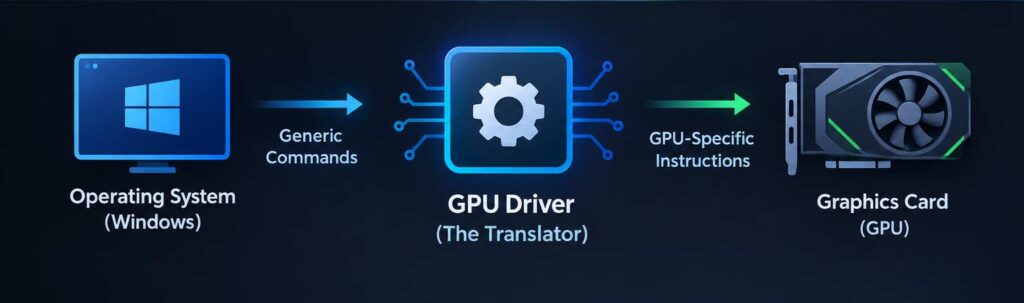
A GPU driver is the translator between your graphics card and your operating system. Your graphics processing unit is a physical chip built to handle visual calculations at incredible speed, but on its own, it has no idea how to interpret the commands coming from Windows, a game engine, or a video editing app. The driver bridges that gap. It takes generic instructions from software and converts them into the specific language your particular GPU model understands.
Think of it like a diplomat at an international summit. The GPU speaks one dialect, your operating system speaks another, and the driver sits in the middle making sure nothing gets lost in translation. Without it, your expensive graphics card is little more than an inert piece of silicon.
This matters more than most casual users realize. A brand-new RTX or Radeon card, dropped into a system with no driver installed, won’t display anything beyond basic, low-resolution output. The card’s full capabilities, including hardware acceleration, ray tracing, and multi-monitor support, stay locked away until the correct driver activates them.
Why Driver Updates Matter So Much
Manufacturers like NVIDIA and AMD release new driver versions constantly, and it’s not just busywork. Each release tends to fix specific bugs, patch security holes, and squeeze out extra performance for newly released games. I’ve personally seen a five-year-old graphics card gain a noticeable frame rate boost in a demanding title purely because of a driver optimization, with zero hardware changes involved.
There’s also a compatibility angle that’s easy to overlook. Game studios frequently work directly with GPU manufacturers before a major launch, and the resulting “game-ready” drivers are tuned specifically for that title. Skip the update, and you might face texture glitches, crashes on startup, or visual artifacts that have nothing to do with your PC’s actual power.
Security is the other piece of this puzzle. Outdated drivers can carry vulnerabilities that malicious actors exploit, since a driver operates at a low level within the operating system and can be an attractive target. Regular updates close these gaps before they become a real problem.
Common Symptoms of an Outdated or Broken Driver
Recognizing driver issues early prevents a lot of frustration. Watch for these warning signs:
- Screen flickering or sudden black screens during gameplay
- Noticeably lower frame rates than a game’s system requirements suggest
- Display resolution options that seem limited or incorrect
- Fans spinning at full speed with no clear reason
- Error messages referencing “display driver stopped responding”
Any one of these on its own might point to something else, like overheating or a failing power supply. But when several show up together, especially right after a Windows update or a new game install, the driver is usually the first thing worth checking.
Manual Updates vs. Automated Tools
There are two realistic paths for keeping drivers current. The manual route means visiting NVIDIA, AMD, or Intel’s website directly, identifying your exact GPU model, downloading the correct package, and running the installer yourself. This works fine if you’re comfortable digging through specs and don’t mind checking back periodically.
The second option is software built specifically for updating drivers on PC systems automatically. These tools scan your hardware, compare installed versions against manufacturer databases, and flag anything out of date. For older or less common systems, this approach solves a real headache. Older operating systems, in particular, are notorious for driver support gaps, since manufacturers eventually stop releasing new builds for legacy platforms.
This is where a tool like Driver Booster windows 7 becomes genuinely useful. Because official manufacturer support for Windows 7 has largely dried up, finding compatible, verified drivers through manual searching alone can turn into a frustrating scavenger hunt. An automated scanner that still maintains a database covering older Windows versions removes a lot of that guesswork, particularly for anyone running older machines that still handle daily tasks just fine but need a graphics refresh.
A Practical Approach to Driver Maintenance
From working with a fair number of aging desktop builds over the years, I’ve found a middle-ground approach works best. Check for driver updates whenever a major new game releases, whenever you notice new performance issues, and roughly once every few months as routine maintenance. There’s no need to chase every minor point release the moment it drops, since some early builds carry their own bugs before they get patched.
Before any update, it’s worth using the display driver uninstaller utility to fully wipe old driver files rather than simply installing over them. Residual files from a previous version occasionally cause conflicts that a clean install avoids entirely. This extra step takes a few minutes but resolves a surprising number of “the update didn’t fix it” complaints.
Wrapping Up
A GPU driver might be invisible in daily use, but it’s doing constant, essential work translating instructions between your hardware and everything running on your screen. Keeping it current isn’t just a performance nicety; it’s a genuine factor in stability, security, and getting the most out of hardware you’ve already paid for. Whether you handle updates manually or lean on dedicated software, the goal is the same: make sure the translator between your PC and your graphics card is never working with an outdated dictionary.